SIGN IN YOUR ACCOUNT TO HAVE ACCESS TO DIFFERENT FEATURES

FORGOT YOUR PASSWORD?

FORGOT YOUR DETAILS?

AAH, WAIT, I REMEMBER NOW!
IF ANY QUESTIONS? CALL: (+994 77) 5222100 E-MAIL: OFFICE@RAM5N.COM

RAM5N, Inc.

  • HOME
  • SERVICES
  • OUR COMPANY
  • PORTFOLIO
  • WORK HISTORY
  • SUBSIDIARIES
    • weIslam
    • weUniverse
    • weServer
    • MUSIC
    • weAds
    • wePhotography
    • Folk Medicine and Health
  • WENEWS
    • weNews (All News)
  • CONTACT
    • Write to Us
  • MY CART
    No products in cart.
 January 14, 2026

Update Google Chrome (September 18, 2019)

Wednesday, 18 September 2019 by RAM5N, Inc.

The latest version fixes serious security flaws

Google’s latest update to the Chrome browser contains patches for vulnerabilities that, if exploited, could allow remote hijackers to take control over the user’s device. According to publicly available alerts, an attacker could run malicious code simply by tricking victims into just opening a specially crafted Web page on the affected Chrome browser. The security flaws affect Chrome for Windows and Mac. Google says it won’t disclose any further details until most users have updated their browsers.

To get the vulnerabilities patched, you need to update Google Chrome:

  • Simply restarting Chrome should suffice. After that, to make sure everything’s up to date, you can click the three stacked dots in the top right corner (called Customize and Control Google Chrome), then Help → About Google Chrome. If the number you see there is 77.0.3865.90 (or higher), then Chrome is up to date. If not, Chrome will start searching for available updates (you’ll see a spinning circle) and in a moment the number of the latest available version will be displayed; click Relaunch.

Source: Kaspersky Lab

For permission content from this site must be hyperlinked when used!

GoogleGoogle ChromeGoogle Chrome Issuesram5n.comweTechnologyweTechnology News
Read more
  • Published in Google, weTechnology
No Comments

Google removes ‘view image’ button from search results to make pics harder to steal [US]

Thursday, 15 February 2018 by RAM5N, Inc.

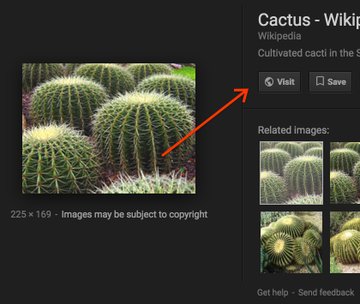
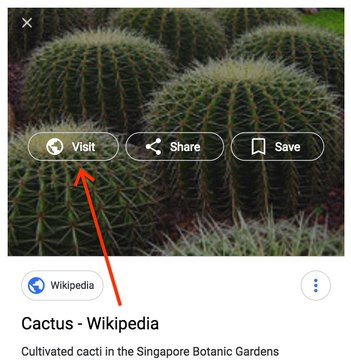
Google is making a change to image search today that sounds small but will have a big impact: it’s removing the “view image” button that appeared when you clicked on a picture, which allowed you to open the image alone. The button was extremely useful for users, since when you’re searching for a picture, there’s a very good chance that you want to take it and use it for something. Now, you’ll have to take additional steps to save an image.

The change is essentially meant to frustrate users. Google has long been under fire from photographers and publishers who felt that image search allowed people to steal their pictures, and the removal of the view image button is one of many changes being made in response. A deal to show copyright information and improve attribution of Getty photos was announced last week and included these changes.

View image on TwitterView image on Twitter

Today we’re launching some changes on Google Images to help connect users and useful websites. This will include removing the View Image button. The Visit button remains, so users can see images in the context of the webpages they’re on. pic.twitter.com/n76KUj4ioD

— Google SearchLiaison (@searchliaison) February 15, 2018

The intention seems to be either stopping people from taking an image altogether or driving them through to the website where the image is found, so that the website can serve ads and get revenue and so people are more likely to see any associated copyright information. That’s great news for publishers, but it’s an annoying additional step for someone trying to find a picture. Now you’ll have to wait for a website to load and then scroll through it to find the image. Websites sometimes disable the ability to right click, too, which would make it even harder for someone to grab a photo they’re looking for.

Fortunately, there’s still at least one way around it: if you right click, you can select “open image in new tab” or “view image” (or whatever your browser’s equivalent option is), and you’ll still open up the full-size picture. It’s just a bit less likely that everyone will realize this is an option. And since the “visit” site button is now the most visible button, that’s probably what’ll end up getting clicked the most.

In addition to removing the “view image” button, Google has also removed the “search by image” button that appeared when you opened up a photo, too. This change isn’t quite as big, however. You’ll still be able to do a reverse image search by dragging the image to the search bar, and Google will still display related images when you click on a search result. The button may have been used by people to find un-watermarked versions of images they were interested in, which is likely part of why Google pulled it.

While it’s good to see Google protecting photographers and driving traffic to websites, it’s still hard not to be a little annoyed by the changes. There are plenty of legitimate and legal uses for copyrighted images. And while it’s fair to ask users to do their due diligence by making sure they’re properly attributing photos, these changes really seem designed to stop images from being grabbed in the first place.

Source: The Verge

For permission content from this site must be hyperlinked when used!

GoogleGoogle Removal View Image Buttonram5n.comTechnologyUSAweTechnology
Read more
  • Published in Google, weNews, weTechnology
No Comments

Recent Posts

  • Backlink nədir - What is Backlink

    Backlink nədir? [AZ]

    Backlink – bir veb saytdan digərinə verilmiş li...
  • What is Framework - Freymvork nədir

    Framework nədir? [AZ]

    Freymvork (ing. framework) – proqram sisteminin...
  • Alimlər suyun yeni halını kəşf ediblər - ram5n.com

    Alimlər suyun yeni halını kəşf ediblər [AZ]

    Amerikalı tədqiqatçıların fikrincə, həddən artı...
  • Rare celestial event ‘planet parade’ to occur after 37 years

    A series of rare and unique celestial events wi...
  • “Yay Günəş duruşu” mövzusunda elmi-praktiki seminar keçirilib [AZ]

    AMEA-nın Naxçıvan Bölməsinin Batabat Astrofizik...

Recent Comments

  • Ss on Saytların bloklanması ilə bağlı RƏSMİ AÇIQLAMA [AZ]
  • Rehman Farooq on How to Optimize SSD for Faster Performance (Windows Tweaks)
  • evernessince on How to Optimize SSD for Faster Performance (Windows Tweaks)
  • Wilbur on How to Optimize SSD for Faster Performance (Windows Tweaks)
  • Farouk on Best way to fix format USB before use

Archives

  • March 2022
  • February 2022
  • September 2020
  • July 2020
  • June 2020
  • April 2020
  • March 2020
  • January 2020
  • December 2019
  • October 2019
  • September 2019
  • August 2019
  • July 2019
  • June 2019
  • May 2019
  • April 2019
  • March 2019
  • February 2019
  • January 2019
  • December 2018
  • November 2018
  • September 2018
  • August 2018
  • July 2018
  • June 2018
  • May 2018
  • April 2018
  • March 2018
  • February 2018
  • January 2018
  • December 2017
  • November 2017
  • October 2017
  • September 2017
  • August 2017
  • July 2017
  • June 2017
  • May 2017
  • April 2017
  • March 2017
  • February 2017
  • January 2017
  • December 2016
  • October 2016
  • September 2016
  • August 2016
  • July 2016
  • June 2016
  • May 2016
  • April 2016
  • March 2016
  • February 2016
  • January 2016
  • December 2015
  • November 2015
  • October 2015
  • August 2015
  • June 2015
  • April 2015
  • January 2015
  • December 2013
  • November 2012
  • July 2008

Categories

Calendar


« January 2026 »
Mo Tu We Th Fr Sa Su
      1 2 3 4
5 6 7 8 9 10 11
12 13 14 15 16 17 18
19 20 21 22 23 24 25
26 27 28 29 30 31  

Calendar by Kieran O'Shea

Categories

  • Android
  • Apple Inc
  • Azerbaijan
  • Azerbaijani Cellular Network
  • Catastrophes
  • Coding
  • CoronaVirus Epidemic
  • Faceebook Inc
  • Financial
  • Folk Medicine
  • Google
  • Holidays
  • How-Tos
  • Mobile
  • Networking
  • News of Azerbaijan
  • Paranormal Events
  • PC & Notebook
  • Posts
  • Programming
  • Psychology
  • Samsung
  • Social Network
  • Technology
  • U.S.A
  • Uncategorized
  • weCommunication
  • weDesign
  • weHealth
  • weIslam
  • weNews
  • wePhotography
  • weScience
  • weSoftware
  • weTechnology
  • weUniverse
  • World

Recent Post

  • Backlink nədir - What is Backlink

    Backlink nədir? [AZ]

  • What is Framework - Freymvork nədir

    Framework nədir? [AZ]

  • Alimlər suyun yeni halını kəşf ediblər - ram5n.com

    Alimlər suyun yeni halını kəşf ediblər [AZ]

  • Rare celestial event ‘planet parade’ to occur after 37 years

  • “Yay Günəş duruşu” mövzusunda elmi-praktiki seminar keçirilib [AZ]

  • Bu gecə Azərbaycana yay gəlib [AZ]

  • Ölkədə hərəkət məhdudiyyətlərinin tətbiqi ilə bağlı Qərar qəbul edilib [AZ]

  • Koronavirusun Azərbaycan ərazisində geniş yayılmasının qarşısının alınmasına dair əlavə tədbirlər müəyyənləşdirilib [AZ]

  • Azərbaycanda xüsusi karantin rejimi gücləndirilib [AZ]

  • Install this emergency update for Windows 10 [US]

Top Comments

  • Ss on Saytların bloklanması ilə bağlı RƏSMİ AÇIQLAMA [AZ]
  • Rehman Farooq on How to Optimize SSD for Faster Performance (Windows Tweaks)
  • evernessince on How to Optimize SSD for Faster Performance (Windows Tweaks)
  • Wilbur on How to Optimize SSD for Faster Performance (Windows Tweaks)
  • Farouk on Best way to fix format USB before use

Subscribe

Enter your email address to subscribe to this blog and receive notifications of new posts by email.

Join 2 other subscribers
social sharing
  • RAMINSERVER
  • SUPPORT
  • ABOUT US
RAM5N, Inc.

© 2008 - 2023 | All Rights Reserved. Site by 

TOP